When this happens,
do that.
CueValet is the valet for your desktop: it watches for the moment you choose — a pixel turns a colour, a window pops up, a timer fires, you press a key — and does the thing you set: click, type, launch, or notify. No scripts. No AutoHotkey. Just when → then.
3-DAY FREE TRIAL · ONE-TIME · 2 PCs · PORTABLE · 14-DAY REFUND · WINDOWS 10/11

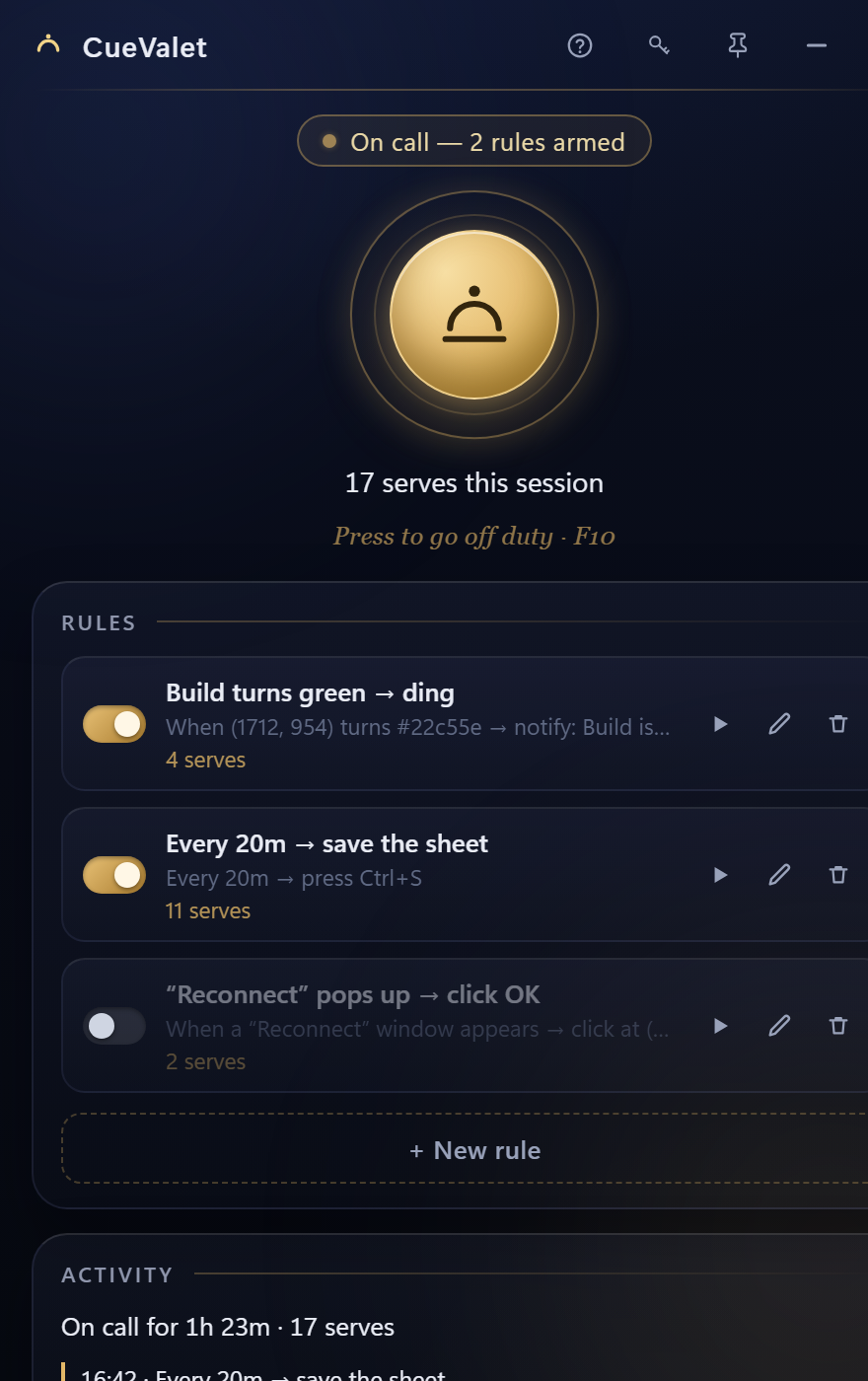
A list of rules. One button that arms them.
No scripting, no flowchart to draw. Build each rule as a plain when → then, press the bell to go on call, and CueValet watches while you work. Touch F10 and it stands down. Every rule has its own switch, and a discreet log shows exactly what it did.
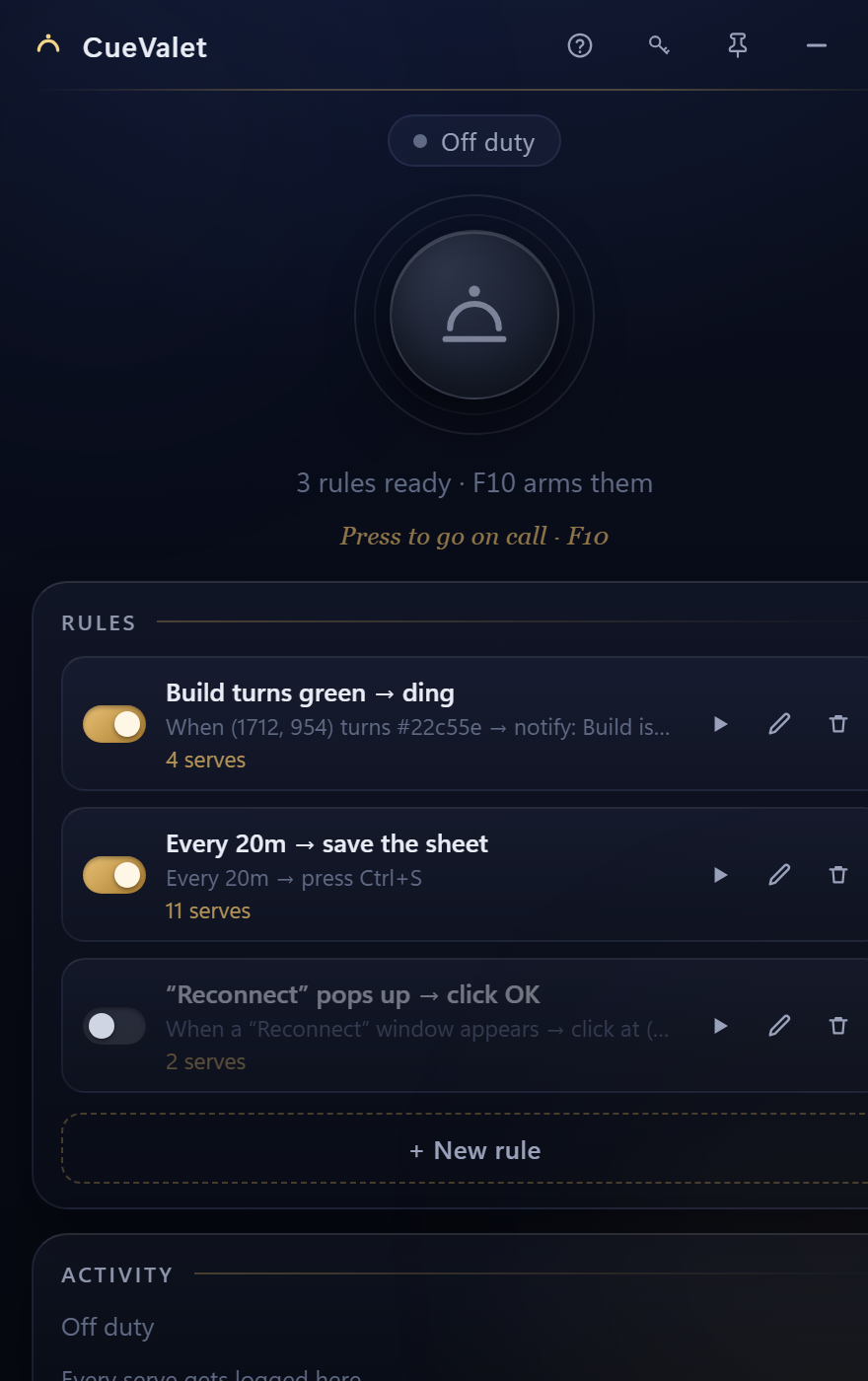
Six cues. Five actions. No code.
Each rule pairs one cue with one action. Mix and match — CueValet does the common jobs a scripting language usually gets dragged in for.
Watch a pixel
Fire when a spot on screen changes, or when it turns a specific colour (with tolerance for anti-aliasing). Pick the point and the colour straight off the screen.
Watch for a window
Fire when a window whose title contains your text appears — a “Save As”, a “Reconnect”, a dialog you keep having to dismiss.
On a clock
Every N seconds, minutes or hours, or at a set time of day. The blunt half of Task Scheduler, without opening Task Scheduler.
On a hotkey
Give any rule its own global hotkey — press it from inside any app and the action runs. Single keys or combos like Ctrl+1.
Then: click or type
Click a point (left/right/double, with the cursor put back after), press a key combo, or type a block of text as if you typed it yourself.
Then: launch or notify
Open an app, a document or a URL — or just get a tray notification with a soft chime, so you know the moment happened without watching for it.
Guard-rails, built in
A minimum gap between fires, and any rule that starts firing too fast pauses itself. A flickering pixel never turns into a machine-gun of clicks.
Portable & 100% local
One small .exe — no installer, no admin, no registry. No telemetry, no analytics, no cloud. It talks to the internet only to check your license key.
Three taps to a working rule.
Pick the cue
Choose what to watch for — a pixel, a window, a timer, a time, a hotkey. For a pixel, click the exact spot on screen; CueValet grabs its colour for you.
Pick the action
Choose what to do — click a point, press keys, type text, open something, or notify. Try it once with the ▶ button before you commit.
Go on call
Press the bell, or hit F10 from any app. CueValet watches for your cues and acts. Press again and it stands down.
Between too blunt and too technical.
Windows has two ends of this and nothing in the middle. CueValet is the middle.
- Task Scheduler only knows time and system events — it can't watch the screen, and its UI fights you. CueValet watches the screen and reads in ten seconds.
- AutoHotkey can do anything, if you learn a scripting language and debug it. CueValet does the everyday jobs with point-and-click.
- Power Automate Desktop is heavyweight, cloud-tied and slow. CueValet is one small local file that starts instantly.
- It's a tool. Repetitive clicking that should have vanished years ago, dialogs you keep dismissing, single-player game grinds, a dashboard you watch for a colour to change — how you use it is your call.
One payment. No subscription.
Buy once, it's yours. The 3-day free trial includes every Pro feature, so you can try the whole thing before choosing.

- The six core cues: pixel change & colour, window, timer, time of day, hotkey
- Five actions: click, keys, type text, launch, notify — one per rule
- Unlimited rules, per-rule hotkeys, pick points & colours off the screen
- Portable edition included — run it from a USB stick, no admin
- License valid on 2 PCs · all 1.x updates · 14-day money-back
- Everything in CueValet, plus:
- Action sequences — one cue → a list of steps, with waits between them
- Image-region, process start/stop and clipboard cues
- HTTP / webhook action — ping a URL when a cue fires
- Rule groups & profiles, plus import / export
SECURE CHECKOUT & EU VAT HANDLED BY LEMON SQUEEZY · INSTANT KEY BY EMAIL
Not sure yet? Download the free trial — 3 days with every Pro feature unlocked, no signup.
Questions, answered.
What is CueValet?
A visual trigger tool for Windows. You build simple rules — when [a cue] do [an action] — without writing code. A cue can be a screen pixel changing or turning a specific colour, a window appearing, a timer, a time of day, or a hotkey. An action can be a click, a key press, typed text, opening an app/file/URL, or a notification. One master hotkey arms and disarms all of it.
Is there a free trial?
Yes. Download CueValet and you get 3 days with everything unlocked — no signup, no card. When the trial ends the app locks until you enter a key. It’s the same file buyers get: a license key simply unlocks it.
Do I need to know how to code?
No. Everything is point-and-click: you pick the spot or the colour straight off the screen, choose the cue and the action from plain menus, and save. It's the middle ground between the Windows Task Scheduler (too blunt) and AutoHotkey (a scripting language).
How is it different from AutoHotkey, Power Automate or Task Scheduler?
Task Scheduler only reacts to time and system events, and can't watch the screen. AutoHotkey can do almost anything but is a programming language you have to learn. Power Automate Desktop is heavyweight and cloud-tied. CueValet does the common 90% — watch the screen or the clock, then click/type/launch/notify — as a small local app, one rule at a time, no code.
Can it run several rules at once?
Yes. Add as many rules as you like; the master hotkey arms and disarms all of them together, and each has its own on/off switch. Actions run one at a time so they never trip over each other.
Does CueValet need administrator rights? Do I need to install it?
No and no. It's a single portable .exe: download, double-click, done — no installer, no drivers, no registry. One caveat: to act inside an app that itself runs as administrator, CueValet has to run as administrator too.
Is it a subscription?
No. $19.99 once. The license works on 2 PCs at the same time and you can move it with one click. All 1.x updates are included.
Does CueValet work offline?
Yes. It checks your license online at launch and keeps working for a few days between checks, so a flight or a weekend off-grid is never a problem.
Why does Windows warn me the first time I run it?
The file isn't code-signed yet, so Windows SmartScreen is cautious with new files — as it should be. Click More info, then Run anyway. The download is exactly the file we published, from this site only. Prefer no prompt at all? Install from the Microsoft Store: same app, same trial.
What are the system requirements?
Windows 10 or 11, 64-bit. Nothing else to install: the WebView2 runtime CueValet uses ships with Windows 11, and with Microsoft Edge on Windows 10.
What if CueValet is not for me?
Email [email protected] within 14 days and you get your money back, no argument. Write even if you're past the window: most problems turn out to be a five-minute fix. Your statutory rights as a consumer are unaffected.